Administration
System health
Watch the gateway's readiness, its built-in health checks and alarms (disk, certificates, clock, backups), self-healing parts, redundancy, and this machine's own settings.
System Health shows how the gateway itself is doing. Everyone can open it; some panels are for administrators.
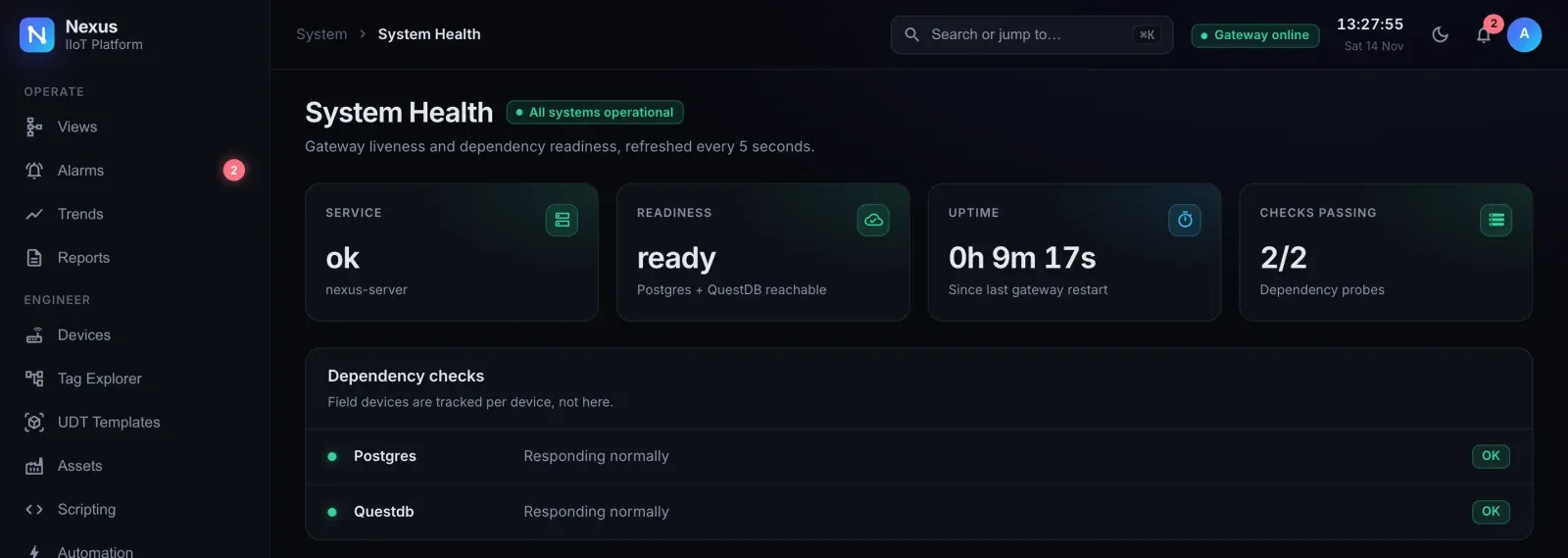
Readiness
The top of the page shows whether the gateway is up and its dependencies respond: PostgreSQL and QuestDB, refreshed every 5 seconds. Field devices are deliberately not part of readiness; each has its own _system.<device>.connected tag.
Gateway health alarms
Four things stop plants without warning, or make the next problem worse: a full disk, an expired certificate, a drifting clock, and backups that quietly stopped. The gateway checks them every minute and alarms on them out of the box:
| Check | Tag (in the Gateway health folder) | Alarms |
|---|---|---|
| Free space on the disk holding the data directory | gateway.health.diskFreePercent | Under 15% (high), under 5% (critical) |
| Days until the first certificate the gateway relies on expires | gateway.health.certificateDaysLeft | Under 30 days (medium), under 7 (high) |
| How far the gateway’s clock is from the database server’s (or a time server) | gateway.health.clockSkewSeconds | Over 5 s (medium), over 60 s (high) |
| Hours since the last good database backup, where the gateway backs them up | gateway.health.backupAgeHours | Over 26 h (medium), over 50 h (high) |
The certificates watched are the ones in use: the HTTPS certificate, the OPC UA server’s, each enabled SAML provider’s signing certificate and each directory’s CA certificate.
These are ordinary tags and alarm rules: change the setpoints, add notification routes, or delete them, and they stay as you left them. They are for engineers, so operator screens leave them out.
Gateway checks lists each check and each certificate with its expiry date.
- A clock alarm usually means the machine’s time sync stopped. On Windows check
w32tm /query /status; on Linuxtimedatectl. - A backup alarm: the backup log says why the last run failed. On Windows,
Start-ScheduledTask 'Nexus backup'tries again.
Isolation and self-healing
Scripts, Node-RED and drivers with native code run apart from the gateway’s main thread. Each is replaced if it hangs, crashes or runs out of memory, and the plant keeps running meanwhile:
| Part | Replaced when | What pauses meanwhile |
|---|---|---|
| The script worker | A script blocks it for 5 s, exceeds its memory, or crashes it | The runs it was making (logged with the reason) |
| The script console | The same | That console run only |
| Node-RED | It dies, exceeds its memory, or is silent too long | Flows, until it is back |
| The driver host (S7, Modbus RTU) | It crashes, exceeds its memory, or a driver call hangs for 10 s | Those devices show disconnected, then reconnect |
The panel shows each part’s restarts and the last reason. Two more guards protect the gateway as a whole:
- The watchdog restarts the gateway if its main thread is stuck (30 seconds by default in production). In a redundant pair the standby takes over at once.
- The memory guard restarts the gateway in an orderly way if memory stays near its limit, rather than letting it run out mid-write.
The same figures are tags (_system.gateway.eventLoopLagMs, .heapUsedPercent, .memoryMb, .uptimeSeconds and the restart counters), so you can trend them or alarm on them through a reference tag.
Redundancy
In a redundant pair, this panel shows both gateways, which one is active, and their heartbeats. On a single gateway it says redundancy is off. See Redundancy.
This gateway
This gateway (administrators) holds the settings of this one machine. Each gateway of a redundant pair has its own:
| Setting | Use |
|---|---|
| Public address | How people and phones reach this gateway: links in alarm emails and texts, report links, sign-in returns from identity providers, QR labels, and the address the other gateway of a pair shows |
| Time server (NTP) | What the clock check compares with: a host name or address, optionally :port |
| Backup status file | Where the database backup task writes its result. Setting it adds the backup check and alarm |
| Log level | How much the gateway logs. Applies at once, for tracking a problem down |
An empty field uses the settings-file variable (NEXUS_PUBLIC_URL, NEXUS_NTP_SERVER, NEXUS_BACKUP_STATUS, NEXUS_LOG_LEVEL), then the default. Changes are in the audit log.