Alarms, history and reports
Alarms
Define alarm rules on any tag, acknowledge and shelve alarms, take them out of service, read the journal, and measure the alarm system's performance.
An alarm rule watches one tag and raises an alarm when its condition is met: a level too high, a pump faulted, a value gone bad. Open Alarms to work with them:
| Tab | For |
|---|---|
| Journal | Alarm events: what is active now and what happened, with who was told and who acknowledged |
| Rules | Creating and editing alarm rules |
| Notification routes | Email, SMS and webhook destinations (see Notifications and on-call) |
| On-call | Schedules, rosters and escalation policies |
| Performance | Alarm system health figures, the shelving policy and the gateway’s alarm ribbon |
Alarm states
| State | Meaning |
|---|---|
| Active, unacknowledged | The condition is true and nobody has acknowledged it |
| Active, acknowledged | Someone has acknowledged it, but the condition is still true |
| Returned, unacknowledged | The condition has cleared, but nobody acknowledged it while it was active |
An alarm ends when it has returned to normal and has been acknowledged.
Priorities
Every rule has a priority: low, medium, high or critical. Priorities set the colour operators see, the order of alarm lists, the horn threshold in applications, and how long an alarm may be shelved.
Alarm types
| Type | Active when |
|---|---|
| hi | The value is above the setpoint |
| hihi | The value is above the setpoint (a second, more severe high limit) |
| lo | The value is below the setpoint |
| lolo | The value is below the setpoint (a second, more severe low limit) |
| digital | The value equals the setpoint, for example 1 for a fault bit |
| deviation | The value is further than the deadband from the setpoint, either way |
| rate_of_change | The value changes faster than the setpoint, in units per second |
| bad_quality | The tag’s quality is bad: device offline, address rejected, read timing out. Takes no setpoint |
Creating a rule
Open Alarms → Rules → Add rule and set:
| Field | Meaning |
|---|---|
| Tag | The tag to watch. For an array tag, the Element to watch |
| Type and Setpoint | When it alarms (see above) |
| Setpoint from tag | Optional: follow another tag’s live value as the setpoint, for an operator-adjustable limit. The fixed setpoint applies while that tag has no numeric value |
| Deadband | How far the value must come back before the alarm returns, to stop chattering. For deviation, the allowed band |
| Delay (s) | On-delay: the condition must last this long before the alarm activates, so brief spikes don’t alarm |
| Priority | low, medium, high or critical |
| Operators | On by default. Off: operator screens leave the alarm out, for alarms only engineers act on. The Alarms page, reports and notifications still include it |
| Routes and Escalate | Who is told (see Notifications and on-call) |
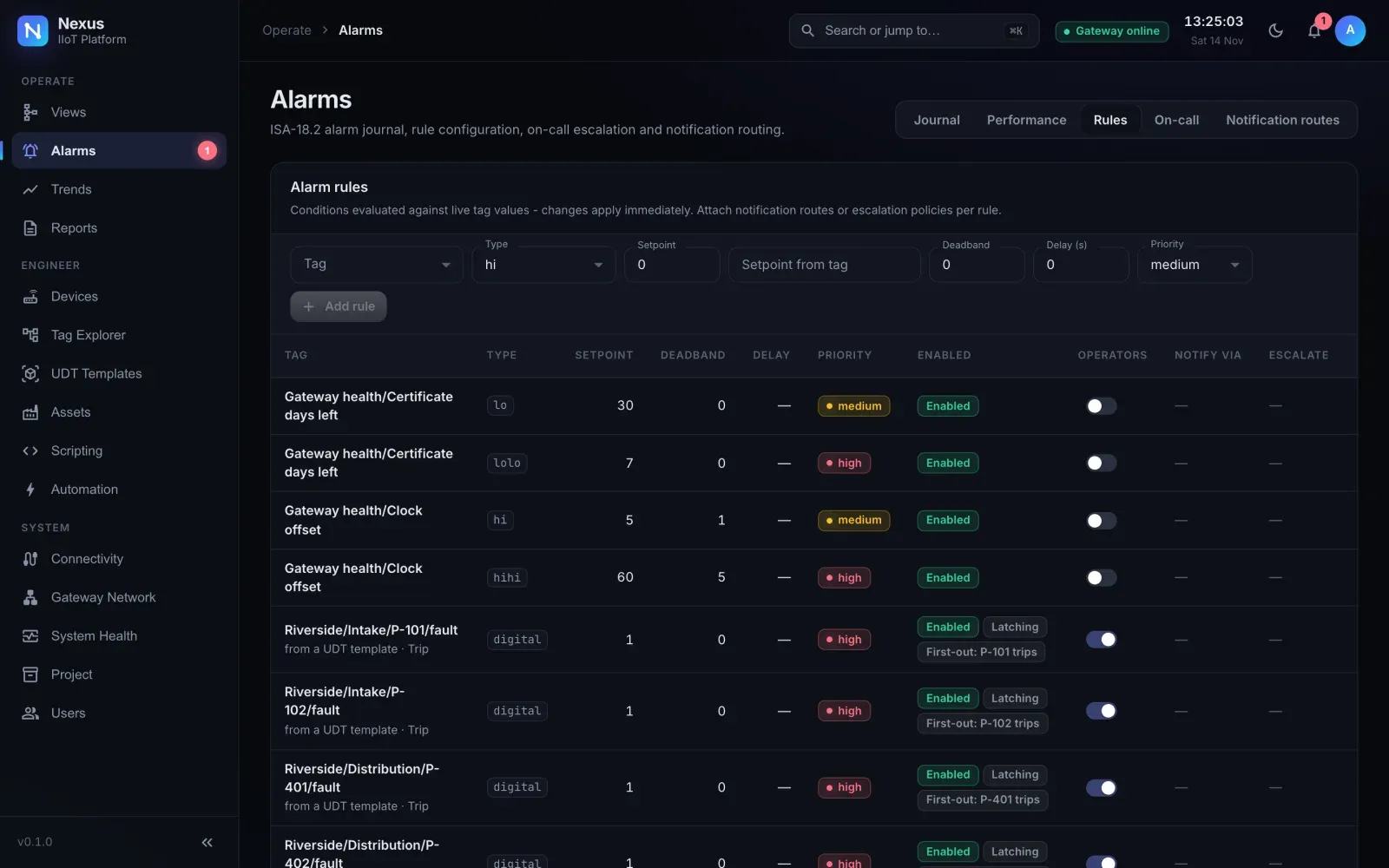
Rules created by UDT templates are marked from a UDT template. Change them in the template, or override the setpoint on the instance.
Alarm details
Open a rule’s details for behaviour and for what the operator is told:
Behaviour
- Clear delay (s): off-delay. The condition must stay clear this long before the alarm returns.
- Latching: the alarm stays active after the condition clears, until someone acknowledges it.
- Enable condition: suppression by design. The rule only alarms while this expression is true, for example
{line1.running}, so a stopped line doesn’t flood operators. - First-out group: the first alarm of a group to activate is marked first-out, showing what tripped the line.
What the operator is told
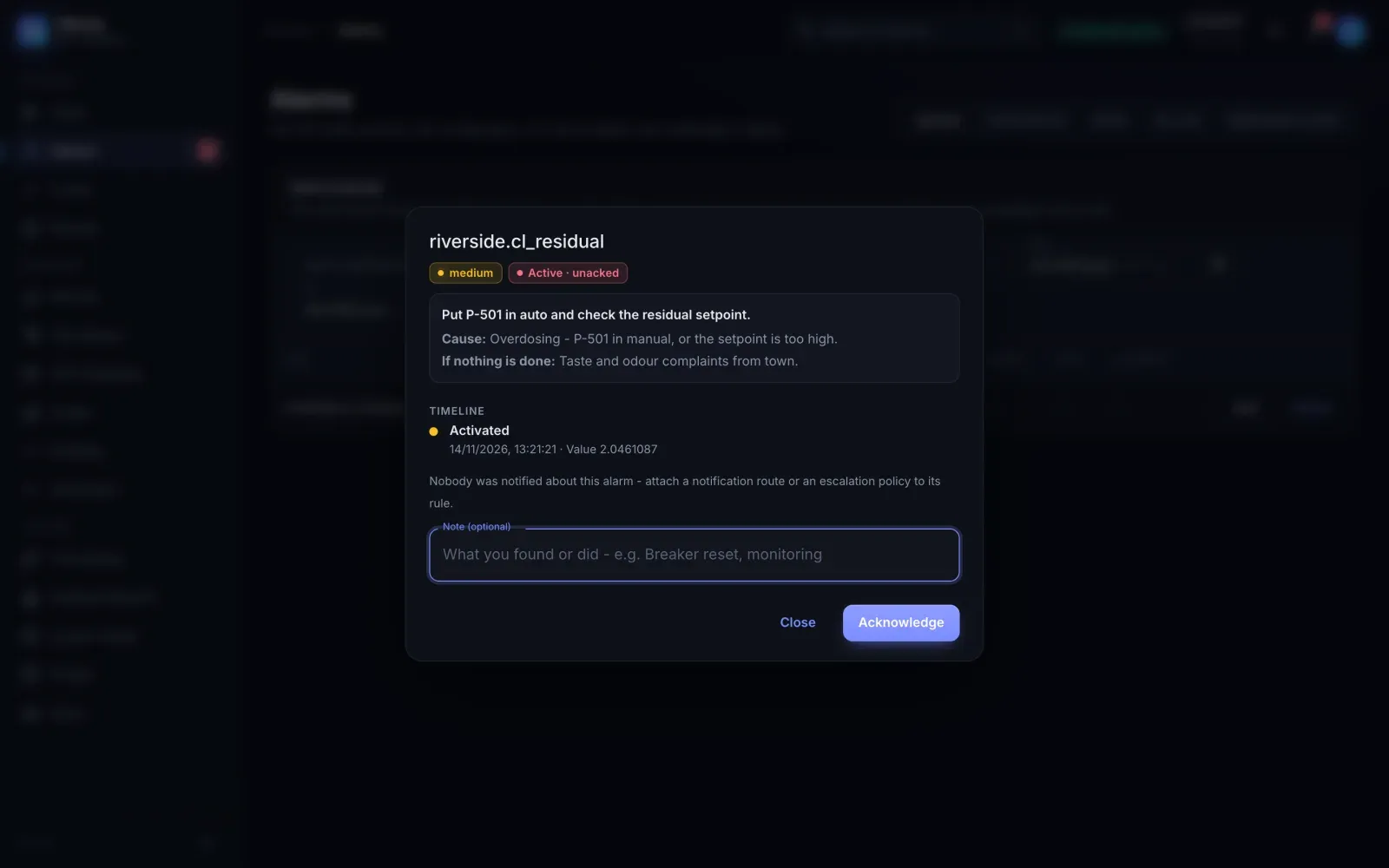
- Cause, Consequence if nothing is done and Corrective action.
- Time to respond (minutes).
- Opened from the alarm: a view (and its parameters) the alarm details link to, such as the faceplate of the equipment.
The journal
Alarms → Journal shows the most recent 100 events matching your filters (priority, state, area or equipment, tag, and a from/to period), refreshed every 10 seconds. Open an event to see its timeline: activation, every notification sent (failed ones with the reason), who acknowledged it and their note, and the return to normal.
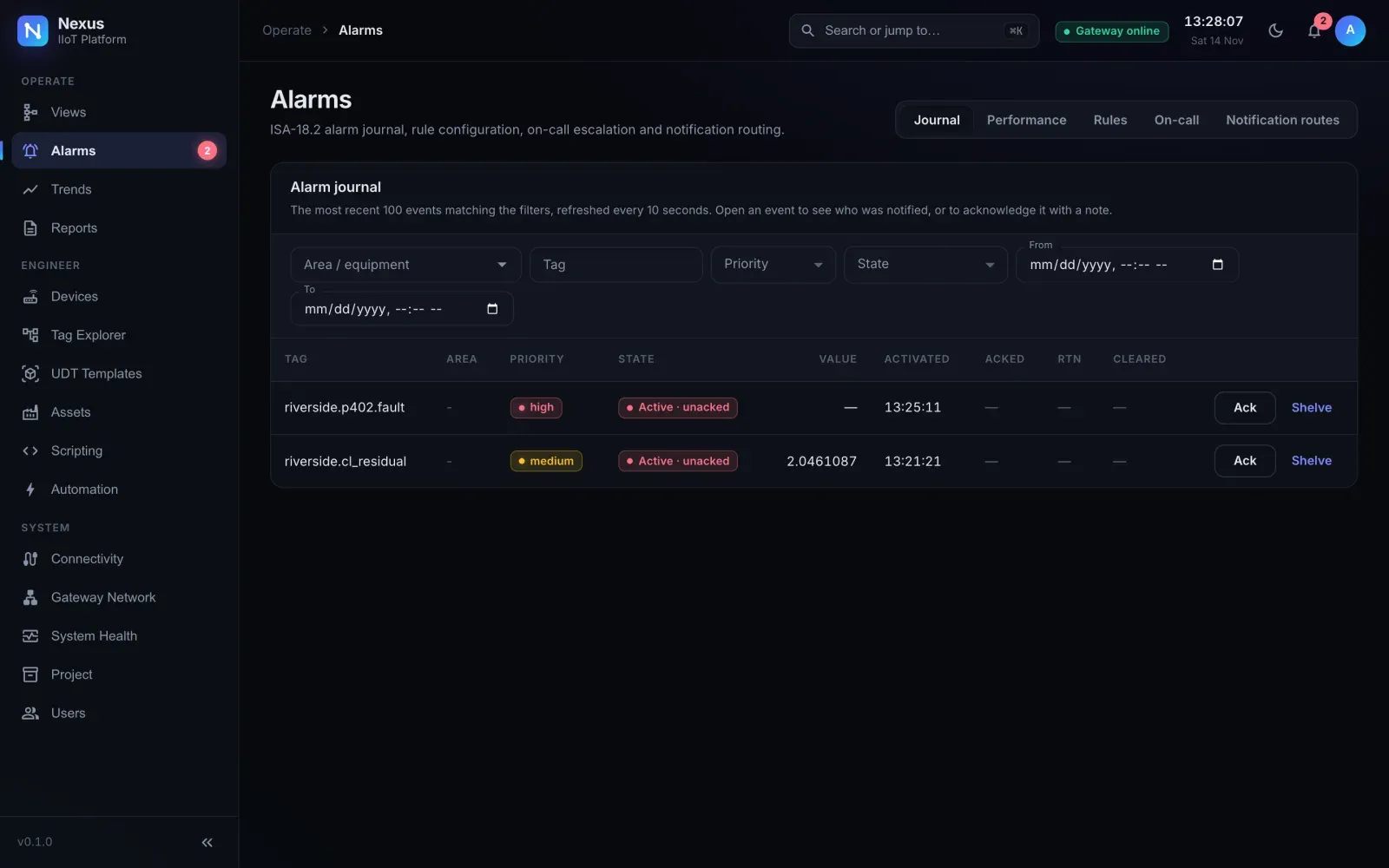
The journal outlives the configuration. Each event keeps the tag path, units, alarm type and the acknowledging person’s name as they were at the time, so renaming or deleting a tag, rule or user doesn’t change history. An alarm that was active when its rule was deleted or disabled ends then.
Acknowledging
Operators with the Acknowledge alarms permission acknowledge an alarm from the ribbon, the bell, an alarm list in a view, the journal, or the link in a notification. An acknowledgement can carry a note, such as Breaker reset, monitoring. Acknowledgements are recorded with the person’s name.
Shelving
Shelving silences an alarm for a while, for example during known maintenance. Shelving always needs a reason, and each priority has a longest shelving time, set under Alarms → Performance → Shelving policy. A shelved alarm comes back when the time is up. Shelving stops escalation.
Out of service
Taking a rule out of service stops it alarming at all, for example while an instrument is replaced. It needs a reason, and can last until a time or until someone puts it back. Who took it out of service, when and why are shown on the rule.
Performance
Alarms → Performance measures the alarm system against the targets of ISA-18.2 and EEMUA 191:
- Alarms per operator per 10 minutes (about 1, 2 at most).
- Peaks, and the share of time spent in alarm floods.
- The mix of priorities (about 80% low and medium, 15% high, 5% critical).
- Chattering alarms: 3 or more within a minute.
- Standing alarms: open for more than 24 hours.
Use it to find the noisy rules worth fixing first. Engineers also set the shelving policy here, and which alarms the ribbon on the gateway’s own pages shows: system alarms only (the default), all alarms, or none.
Gateway health alarms
The gateway alarms on its own health out of the box: low disk space, certificates about to expire, a drifting clock and failed backups. These alarms are for engineers, so operator screens leave them out. See System health.
Alarms from edge gateways
On a central gateway, the open alarms of linked edge gateways appear alongside its own. Acknowledging one there is carried out, and audited, on the edge. See Gateway network.