Integration
Connectivity
Share gateway data and reach people - HTTPS certificates, the OPC UA server, MQTT publishing (Sparkplug B and JSON), the SQL bridge, and email and SMS settings.
Connectivity gathers everything that connects the gateway to other systems and people. All of it is configured in the app, applies at once without a restart, follows tag changes live, and is included in project exports.
| Tab | For |
|---|---|
| OPC UA | The gateway’s own OPC UA server |
| MQTT | Publishing tags to MQTT brokers |
| API & webhooks | API keys and webhooks (see REST API and webhooks) |
| SQL bridge | Database connections and transaction groups |
| The mail server for notifications and reports (administrators) | |
| SMS | The Twilio account for text messages (administrators) |
| HTTPS | The gateway’s certificate (administrators) |
| AI assistant | The assistant’s key and model (administrators; see AI assistant) |
HTTPS
New installs serve the web app, the REST API and live values over HTTPS on port 4443. Port 4000 then only redirects there (so bookmarks keep working) and answers health checks.
- First start: the gateway makes a self-signed certificate for its host name,
<name>.local,localhostand its IP addresses. Browsers warn until it is trusted. That is fine while commissioning, not for the plant. - A certificate from your certificate authority: under Connectivity → HTTPS, Create request makes a new key and a certificate request (CSR) for the names people use. The key never leaves the gateway. Give the request to IT, then paste the certificate they return (with any intermediates) under Install a certificate. It takes effect at once, without a restart. A certificate and key made elsewhere can be pasted the same way.
- Managed elsewhere (an enterprise PKI agent, certbot): point
NEXUS_TLS_CERT_FILEandNEXUS_TLS_KEY_FILEat the PEM files and restart after they change.
With a certificate from a CA, the gateway also tells browsers to always use HTTPS for it (HSTS). TLS 1.2 or later is required. Barcode scanning with a camera needs HTTPS with a trusted certificate.
The gateway alarms 30 days before its certificate expires (see System health).
OPC UA server
The gateway can serve its tags to SCADA systems, MES and historians over OPC UA.
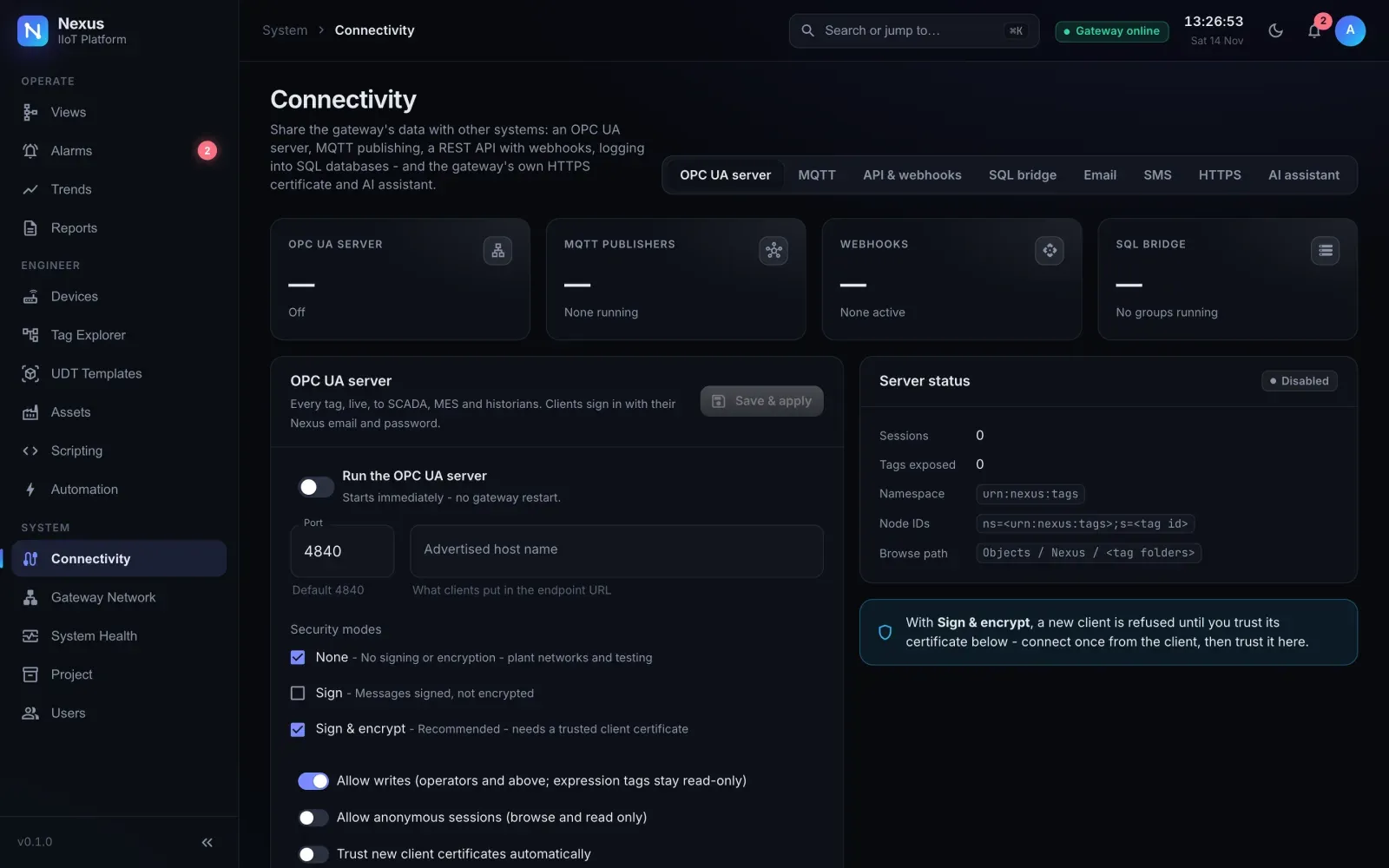
- Every tag, or only the folders you choose, appears under
Objects/Nexus/<tag folders>, with NodeIdsns=<urn:nexus:tags>;s=<tag id>. Values, quality and timestamps are pushed as they change, and the address space follows tag edits without dropping subscriptions. - Users sign in with their Nexus email and password, or their Active Directory / LDAP username and password. Everyone can browse and read; roles with Operate can write, when writes are allowed. Anonymous sessions, if enabled, are read-only. Every write is checked and audited like one from the web app.
- Security: endpoints for None and/or Sign and SignAndEncrypt (Basic256Sha256, Aes128_Sha256_RsaOaep, Aes256_Sha256_RsaPss). A client on a secure endpoint is refused until its certificate is trusted: connect once, then trust it in the Client certificates list, or turn on Trust new client certificates automatically while commissioning.
- Docker: set Advertised host name to the Docker host’s name or IP, which clients use to reconnect.
The server listens on port 4840.
MQTT publishing
Each publisher sends some or all tags to one broker, in one of two formats.
Sparkplug B
The gateway acts as an edge node, spBv1.0/<group>/…/<edge node>:
- An NBIRTH with every tag as a metric named by its path, then NDATA by alias for changes.
- NDEATH as the MQTT will and on shutdown, and a new NBIRTH when tags change or a host asks for a rebirth.
- Quality travels as the metric’s
Qualityproperty (192 good, 64 uncertain, 0 bad).
Sparkplug host applications pick it up as is.
JSON (unified namespace)
One retained topic per tag, with a payload such as:
{ "value": 42.1, "quality": "good", "timestamp": "2026-11-13T06:00:00.000Z", "tagId": "plant.t101.level", "units": "%" }The topic layout is either the tag path (<prefix>/<tag path>) or the asset model (<prefix>/<asset path>/<path below the linked folder>), for a unified namespace. <prefix>/$state is online or offline (the will). Topics of deleted tags are cleared.
Writes from MQTT
With Accept writes on, Sparkplug NCMD metrics and JSON <tag topic>/set messages write tags. Anyone who can publish to the broker can then write, so restrict the broker’s access control. Changes are combined for Send changes every (default 1 s) and sent together.
SQL bridge
The SQL bridge connects the gateway to external PostgreSQL or MySQL/MariaDB databases.
- Database connections are used by transaction groups and by query tags.
- A transaction group logs one row of tag values into a table, on a schedule or when a trigger tag changes or goes true, with a timestamp column (UTC) and an optional quality column. The table and any missing columns are created on first use (numbers as
DOUBLE, booleans asBOOLEAN, text asTEXT); columns are never dropped.
When the database can’t be written, rows are buffered on the gateway’s disk and written in order once it is back. Use a database account that can only create and insert into its own schema.
Administrators set up mail servers under Connectivity → Email as named profiles: say Alarms through the plant’s relay and Reports through Microsoft 365. Each has a server, port, security (STARTTLS when offered on 587 or 25, TLS on 465, or STARTTLS required), user name and password, and the From address.
- Send test in a profile’s dialog tries the settings in the form, saved or not, and shows the server’s answer when it fails (
535 Authentication failed,connect ECONNREFUSED). - Saved profiles apply at once, on both gateways of a redundant pair.
- Passwords are stored encrypted and never shown again. Changes are in the audit log.
- Microsoft 365 and Gmail need SMTP AUTH enabled for the account, or an app password.
One profile is the default: the first one always is, and any can be made the default from its menu. Where email goes out, you can pick a profile, and anything that doesn’t uses the default:
- an email notification route;
- an escalation policy, for the people on call it emails;
- a report schedule’s email delivery.
The pickers show once there are two profiles or more. Delete a profile and what used it falls back to the default, so no notification is lost. Engineers choosing a profile see only names, never servers or users.
With no profile saved, the SMTP_* settings-file variables are used, and the first profile you add starts from them.
Cameras and web pages
Administrators add cameras and allowed sites under Connectivity → Cameras & web pages, for the Camera and Web page symbols in views.
- Cameras: each IP camera’s MJPEG stream or JPEG snapshot address, as the gateway reaches it, with a user name and password if it needs one. The gateway fetches the camera and relays it, so the password never reaches a browser, and screens that can only reach the gateway can still show cameras on the plant network. Show it on a camera’s row shows what a view will see.
- Web pages: a Web page symbol shows the gateway’s own pages, and the sites allowed here. Every other site the browser refuses to show. Allowing a site allows every page on it (
https://grafana.plant.local:3000), and the site must also allow itself to be framed. Pages are sandboxed: forms and new windows work only when the symbol allows them.
SMS
Administrators set the Twilio account under Connectivity → SMS: Account SID, auth token, and the number (or messaging service, MG…) texts come from.
- Send test tries the form, saved or not, and shows Twilio’s answer when it fails.
- Saved settings apply at once on both gateways. The token is stored encrypted; only its last characters are shown.
- Texts are billed to the Twilio account.
Saved settings take precedence over the TWILIO_* variables.
Ports
| Direction | Port | For |
|---|---|---|
| In | 4443 | Web app, REST API and gateway network over HTTPS |
| In | 4000 | Redirect to HTTPS and health checks |
| In | 4840 | OPC UA server |
| Out | 1883 / 8883 | MQTT brokers |
| Out | 80 / 443 | Webhook endpoints, Twilio, the AI assistant |
| Out | 5432 / 3306 | SQL bridge databases |
| Out | 587 / 465 / 25 | Mail server |