Automation
Scripting
Run JavaScript on the gateway - tag scripts, gateway event scripts (timer, scheduled, startup, shutdown, tag change, alarm, message handler), a shared library, secrets, the console and the log.
Scripts are JavaScript that runs on the gateway with the nexus.* API: read and write tags, query history, acknowledge alarms, call web services and more. The full API is on the Script API page.
Managing scripts needs the Manage scripts permission. Scripts run with the gateway’s privileges, so only give it to people you would trust with that.
Open Scripting:
| Tab | For |
|---|---|
| Gateway events | Scripts that run on a timer, a schedule, at startup or shutdown, on tag changes, on alarms, or when called |
| Library | Shared helper modules, called from any script as shared.<module>.<function> |
| Secrets | Passwords, API keys and tokens for scripts |
| Console | Try code on the gateway |
| Log | Output and errors from every script |
Tag scripts
A tag script runs every time its tag changes. Open a tag in Tag Explorer and add a script. It gets:
| Variable | Value |
|---|---|
value | The new value |
previousValue | The value before (null on the first change) |
quality, previousQuality | 'good', 'uncertain' or 'bad' |
timestamp | When the change happened |
tagId | The tag that changed |
initialChange | true for the first value since the gateway started |
// Count pump starts
if (value === true && previousValue === false) {
  const starts = nexus.tag.readValue('plant.p101.starts') ?? 0;
  await nexus.tag.write('plant.p101.starts', starts + 1);
}
UDT template members can carry tag scripts for every instance (see UDT templates).
Gateway event scripts
Choose Gateway events → New and pick a kind:
| Kind | Runs | Gets |
|---|---|---|
| Timer | Every interval. A run never overlaps the previous one | |
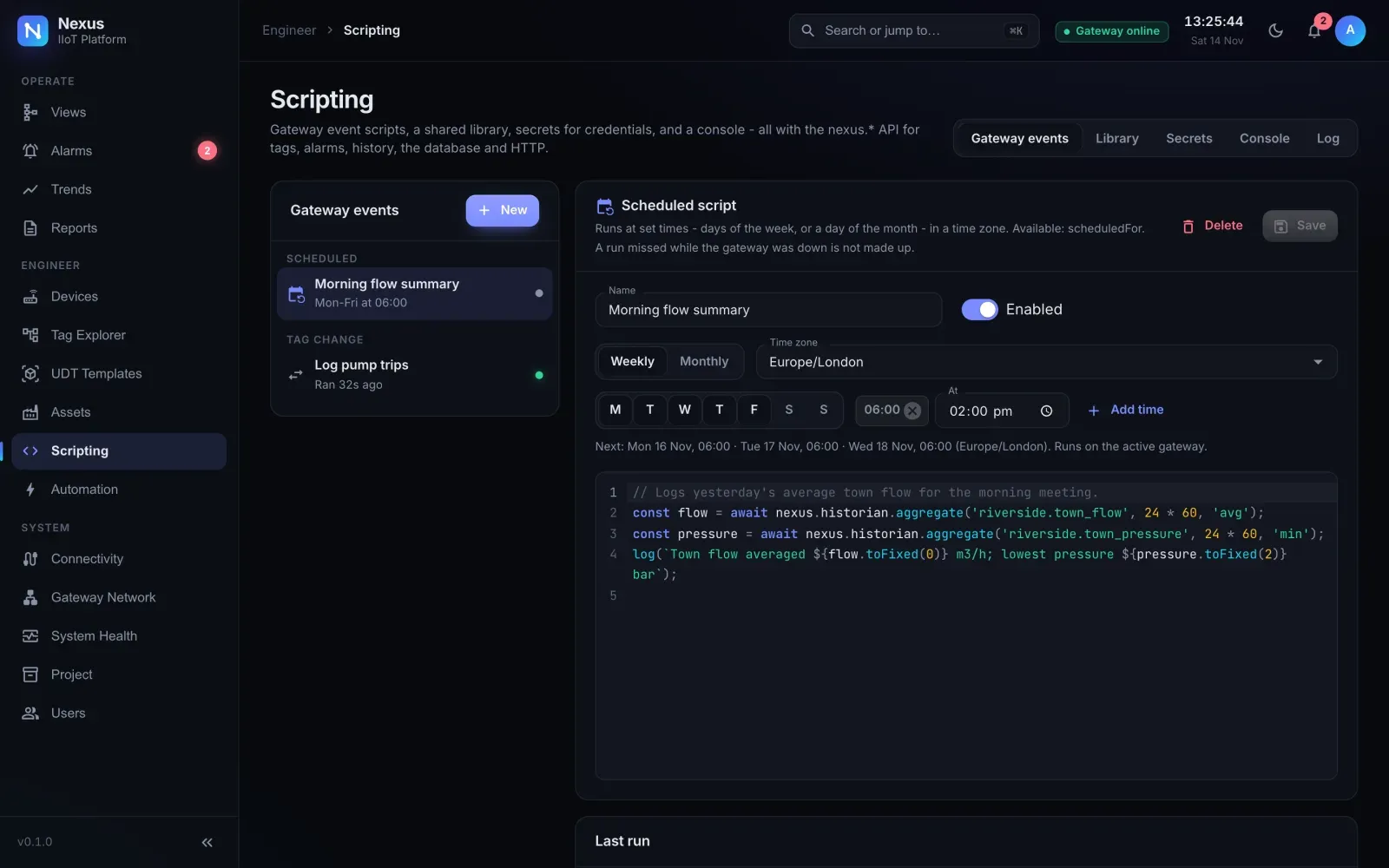
| Scheduled | At set times: chosen days of the week at one or more times, a day of the month, or a cron expression, in a time zone | scheduledFor: when the run was due |
| Startup | When the gateway starts, and again whenever you save the script | |
| Shutdown | When the gateway stops (5-second limit) | |
| Tag change | When any of the selected tags changes | tagId, value, previousValue, quality |
| Alarm | On the selected alarm transitions | event, action (activated, acked, rtn, cleared…) |
| Message handler | When a view button, a barcode scan or an API client calls its handler name | payload, user, view, handler |
Each script has a name, can be enabled or disabled, and shows when it last ran and its last error.
Scheduled scripts
Scheduled scripts use the same schedule fields as report schedules, in a time zone, so 06:00 stays 06:00 across daylight saving:
- Weekly: chosen days at one or more times, such as Mon-Fri at 06:00 and 18:00.
- Monthly: a day of the month, or the last day, such as the last day at 23:30.
- Cron: a cron expression (below).
The editor shows the next three runs. A run still going when the next is due isn’t doubled, and runs missed while the gateway was stopped (or standby) are not made up. Use a timer script for every N seconds.
Cron expressions
Cron takes the standard five fields: minute, hour, day of month, month and day of week. Each takes *, a value, a range (1-5), a list (1,15) and steps (*/15), and months and days can be names (JAN, MON).
| Expression | Runs |
|---|---|
*/15 6-18 * * 1-5 | Every 15 minutes from 06:00 to 18:45, Monday to Friday |
0 6,14,22 * * * | At each shift change |
30 2 1 JAN,JUL * | At 02:30 on 1 January and 1 July |
0 9 1 * FRI | At 09:00 on the 1st, and every Friday |
@hourly, @daily, @weekly, @monthly, @yearly | As they say |
Sunday is 0 or 7. As in cron, when both the day of month and the day of week are set, a day matching either runs. The editor says what’s wrong with an expression as you type it, and reads common ones in words (Mon-Fri at 06:00). The shortest step is a minute.
// Mon-Fri 06:00, 14:00, 22:00: log the shift's production
const made = nexus.tag.readValue('plant.line1.count');
log('shift ending', scheduledFor, 'made', made);
await nexus.tag.write('plant.line1.count', 0);
Message handlers
A message handler runs when something calls its handler name:
- A view button or symbol with the action Run a gateway script (see Views), with a payload whose
${params}are filled in. - A barcode scan, with the code in
payload.code. - An API client:
POST /api/v1/messages/<handler>with{"payload": {...}}(see REST API).
It sees payload, user ({ id, email, role }, or the API key’s name) and view ({ viewId, params }, or null). What it returns goes back to the caller:
| Return | The operator sees |
|---|---|
| A string | The text as a message |
{ message, severity } | A message styled as success, info, warning or error |
{ navigate: { viewId, params } } | The view opens |
{ popup: { viewId, params, title } } | The view opens as a popup |
// Handler "start-pump", called by a button with payload { pump: "${pump}" }
if (nexus.tag.readValue(payload.pump + '.interlock')) {
  return { message: 'Interlock active - cannot start', severity: 'error' };
}
await nexus.tag.write(payload.pump + '.start', true);
return 'Start command sent';
Operators and write API keys may call handlers; viewers and read keys may not. Calls are audited. A standby gateway refuses them, as it refuses other writes.
The library
Library holds shared modules. Top-level functions in a module are exported automatically, and other values with exports.NAME = value. Call them from any script:
// Module "units"
function cToF(c) {
  return c * 1.8 + 32;
}
// Any script
const f = shared.units.cToF(nexus.tag.readValue('plant.t101.temp'));Secrets
Secrets keeps passwords, API keys and tokens out of script code. Add one by name (erp.password), then read it in any script:
const password = nexus.secret.get('erp.password');
await nexus.net.http({ url: 'https://erp.plant.local/api/orders', headers: { authorization: `Basic ${password}` } });- Values are write-only: once saved they are never shown again. The screen shows the name, length, who changed it and which scripts read it.
- Every value is masked (
••••••) wherever script output appears: the log, console results and errors. - Values are stored encrypted, so a database backup holds no readable secrets. If the gateway’s secret key changes, stored secrets become unreadable; the screen flags them so you can enter them again.
nexus.secret.getthrows if the secret doesn’t exist;nexus.secret.haschecks first.
The console
Console runs code on the gateway straight away, for trying things out. Use return to show a value and log() to print; Ctrl + Enter (⌘ + Enter) runs. The console runs in its own worker, so an experiment can’t disturb production scripts. Writes it makes are real.
The API reference beside every editor lists what each kind of script can use, with completion as you type.
The log
Log shows output (log(), console.log/warn/error) and errors from every script, the most recent 1,000 lines, as they happen.
Limits and safety
- Scripts run in a separate worker thread, never on the gateway’s main thread.
- A script that blocks its worker for 5 seconds (an endless loop), runs out of memory, or crashes it is stopped. The worker is replaced and the stop is logged with the reason; the plant keeps running.
- Synchronous calls such as
nexus.tag.readValue()return straight away. - In a redundant pair, scripts only run on the active gateway.
Scripts in projects
Projects carry tag scripts, gateway scripts, library modules and template scripts. Someone with Engineer but not Manage scripts imports everything except code, and the report says what was skipped.